Accept local payment methods through one pay-in API
Your buyers pay with the bank and wallet methods of their own country, and you integrate one request for all of them. Each completed pay-in is credited to your USDT balance and reported to your server by a signed webhook.
Pay-in methods by market
ATLAS takes pay-ins in six markets. You choose the method for each order with its method code, and the payment-methods endpoint returns the codes contracted for your account, so the list you see is your own and can differ from another merchant's.
| Market | Pay-in methods | Payment screen | Currency |
|---|---|---|---|
 India | UPI, UPI Intent, IMPS | Hosted, embedded or your own (H2H) | INR |
 South Korea | Bank transfer, Kakao Pay | Hosted, embedded or your own (H2H) | KRW |
 Argentina | Transfer to a CVU or CBU | Your own (H2H) | ARS |
 Venezuela | Pago Móvil | Your own (H2H) | VES |
| Turkey | Havale, IBAN | API | TRY |
| Europe and the UK | Visa, Mastercard, Apple Pay, Google Pay | API | EUR, GBP (UK) |
To collect payments in INR or KRW, paymentMethod is required, because several rails share each of those markets, and amounts are whole rupees or whole won. A fractional amount is rejected, never rounded. In Argentina and Venezuela, where you collect in ARS and VES, you can leave the field out and the market's default rail applies; in Venezuela that means any bank pays by Pago Móvil.
How a pay-in runs, from request to credit
-
Create the order
Your server sends a server-to-server request with the amount, currency, market, lifetime in seconds, your order ID, a reference for the buyer and the method. The
201 Createdresponse carries the details the buyer pays to: a UPI ID and QR, an IMPS account with its IFSC, a Korean bank account or Kakao Pay QR, a 22-digit CVU or CBU, or Pago Móvil phone and cédula. -
The buyer pays
They transfer from their banking, UPI or wallet app before the order expires.
-
The reference reaches ATLAS
In India you relay the buyer's UTR. The other markets need nothing extra from you.
-
ATLAS confirms
ATLAS checks the amount, the bank reference and the time before the pay-in closes; when a signal is missing, the order waits for a manual confirmation.
-
You are credited
The status turns Completed, the USDT lands on your balance, and the completion webhook reaches your server with the order's USDT value.
The API docs have the create pay-in request with a sample for each market.
{ "amount": 3049, "currency": "INR", "geo": 3, "expiresIn": 900, "merchantOrderId": "order-in-intent-12345", "clientReference": "customer-7781", "paymentMethod": "upi_intent"}{ "payInId": "6b7c8d9e-0f12-4a34-b5c6-d7e8f9a0b1c2", "displayId": "PI00000991", "upiVpa": "receiver.demo@ybl", "upiIntentLink": "upi://pay?pa=receiver.demo%40ybl&pn=Demo%20Receiver&am=3049.00&cu=INR", "amount": 3049, "expiresAt": "2026-09-09T09:15:00.000Z"}A hosted page or your own payment screen
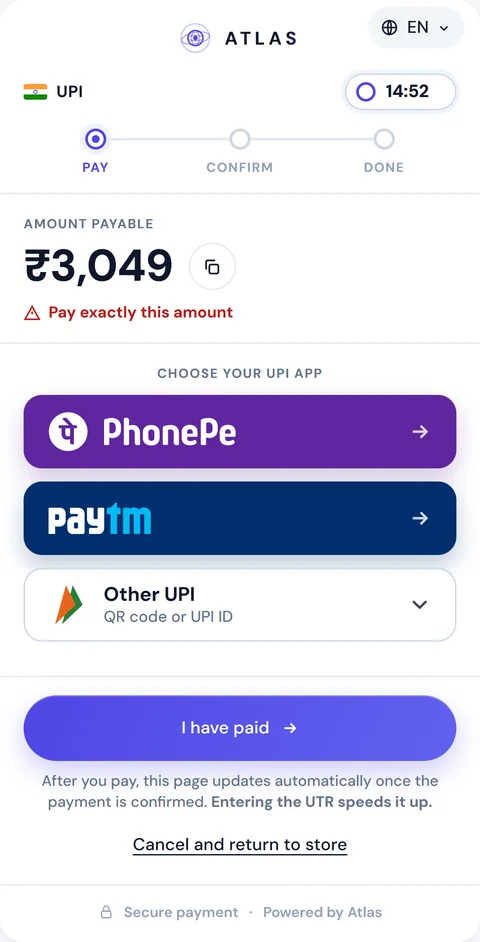
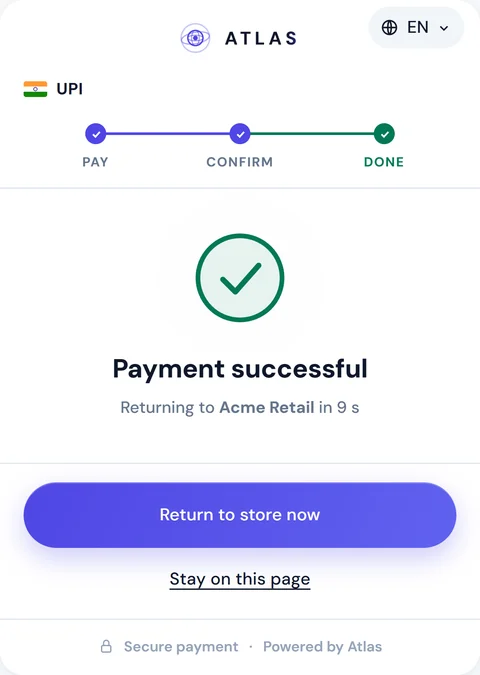
In India and South Korea you can skip building a screen and use the hosted payment page. Add a checkout object to the same create request and send the buyer to checkout.url, or put checkout.embedUrl inside your own checkout with Atlas.mount. The page follows the method you asked for and returns the buyer to your returnUrl. Argentina, Venezuela, Turkey and Europe connect through the API.
On your own screen, the response gives you what each method needs. A UPI order comes with a QR, the UPI ID and an intent link, and on request with PhonePe and Paytm links that open the app with the amount locked. An IMPS order gives an account number and IFSC. A Korean order gives a bank account or a Kakao Pay QR. The response only includes keys that apply to the order's market and rail, so read keys by name.
How each market confirms a payment
What ATLAS needs before it can confirm a pay-in depends on the market.
In India a pay-in can't be confirmed without a UTR. Collect it from the buyer after the transfer and relay it through the UTR endpoint, or let ATLAS record it when it confirms the payment.
ATLAS stores the UTR on the order for matching and support, and the call returns the current status straight away, so you can check the order without waiting for the webhook.
South Korea needs no reference: ATLAS matches the deposit to the order, as the Korean bank transfer page explains.
Argentina pay-ins confirm automatically from the bank's notifications. In Venezuela each pay-in is confirmed by hand, so wait for the completion webhook or poll the status.
{ "utr": "0086543219" }{ "payInId": "1c75c312-93f3-4b34-903e-10fb38a56bec", "displayId": "PI00000007", "status": "WaitingPayment", "utr": "0086543219", "requiresManualConfirmation": true}Statuses, webhooks and safe retries
A pay-in has four statuses. It is WaitingPayment while the details are out, Completed once the payment is reconciled, Expired when its lifetime runs out unpaid and Failed after an administrative cancellation.
An expired order can still turn Completed when it is confirmed by hand later, so your code should accept a late completion.
Each of these outcomes sends a webhook: pay_in.completed, pay_in.expired or pay_in.failed. Check its signature, an HMAC-SHA256 of the raw body signed with your API secret, before you act on the payload; the developer guide to webhooks and HMAC signatures covers the details.
If your server answers with anything other than 2xx, ATLAS tries again, up to 10 attempts over about five hours. The same event can arrive twice, so deduplicate on the event name and the pay-in ID.
Retries from your side are safe as well. Your order ID is the idempotency key: send it again for an order that hasn't failed and you get the original pay-in back.
If a buyer sends less than the order asked for, support can close it on the amount received, and the order keeps your first figure as its original amount.
Disputes on a completed pay-in
When something is wrong with a completed pay-in, open a dispute with POST /api/merchant/disputes. You can contest the whole amount or part of it, and ATLAS holds the funds in question until the dispute is decided.
The dispute starts as PendingEvidence with a 24-hour evidence deadline. You add messages and evidence to its thread, up to 10 files per request. If the deadline passes, the dispute resolves in your favour automatically. You follow it through dispute.opened and dispute.resolved on the same webhook URL, or read the thread with GET /api/merchant/disputes/{id}.
Every pay-in in your merchant dashboard
The portal lists your pay-ins with filters by status, market and date, and exports them to CSV.
Open one and you see a card with the fiat and USDT amounts, the commission and a status timeline with the webhooks that went out. The request log keeps every API call with its response code and signature check, and every webhook with its delivery attempts.
Before you write any code, Pay-Ins → Test Pay Page in the sandbox creates an ordinary pay-in and shows its live status while you walk through the payment steps. The sandbox runs the same contracts as production.
Completed pay-ins add to your USDT balance. When your balance reaches your threshold, USDT goes to your TRC-20 wallet automatically. You can also withdraw on request; USDT settlement has the details. Pay-outs, settlement and the dashboard come together on the page for merchants.
FAQ
Which local payment methods can I accept?
UPI, UPI Intent and IMPS in India, bank transfers and Kakao Pay in South Korea, transfers to a CVU or CBU in Argentina, Pago Móvil in Venezuela, Havale and IBAN in Turkey, and cards with Apple Pay and Google Pay in Europe and the UK. GET /api/merchant/payment-methods lists the methods contracted for your account.
Is there one pay-in API for every market?
Yes. Every market uses POST /api/merchant/pay-in with the same body shape, and the response carries the payment details that apply to the order's market and method.
In which currencies can I collect payments?
INR in India, KRW in South Korea, ARS in Argentina and VES in Venezuela, plus TRY in Turkey and EUR in Europe, EUR or GBP in the UK. You are credited in USDT.
Do I need to send a UTR?
In India, yes: a pay-in there can't be confirmed without one, so relay the buyer's UTR to POST /api/merchant/pay-in/{payInId}/utr. Korean pay-ins confirm without a reference.
Where can I use the hosted payment page?
In India and South Korea. The other markets connect through the API, with the payment details shown on your own screen.
What happens if my webhook endpoint is down?
ATLAS makes up to 10 delivery attempts over about five hours. You can also read any order with GET /api/merchant/pay-in/{payInId}/status.
Can I test pay-ins before going live?
Yes. The sandbox runs the same contracts as production, and its Test Pay Page creates a sandbox pay-in you can follow from payment to webhook.