UPI payment gateway for merchants in India
Accept UPI with one API call. ATLAS returns a UPI ID, a QR code and a link into the buyer's UPI app, matches the transfer by its UTR, and credits you in USDT.
What UPI means for your checkout
UPI, the Unified Payments Interface, is India's account-to-account payment system, run by NPCI. A buyer pays from any UPI app linked to their bank account, PhonePe and Paytm among them, to a UPI ID, also called a VPA, written as handle@psp. They approve the payment with their UPI PIN.
So a UPI checkout has a narrow job: show the payee and the exact amount, get the buyer into their app with little typing, and tie the transfer to the right order. ATLAS gives each pay-in the UPI ID of a local receiving account in the ATLAS network, renders it as a QR and as app links, and matches the transfer by its UTR, the reference the buyer's app shows once the money has gone.

 India
paymentMethod upi upi_intent
- WaitingPayment UPI ID, QR and intent link sent to the buyer
- UTR 417512345678 Checked against the amount and the time
- Completed Credited to your USDT balance
How a buyer pays with UPI through ATLAS
-
Create a UPI order
Your server creates a pay-in with the UPI or UPI Intent method code, an amount in whole rupees and a lifetime in seconds.
-
The buyer picks an app
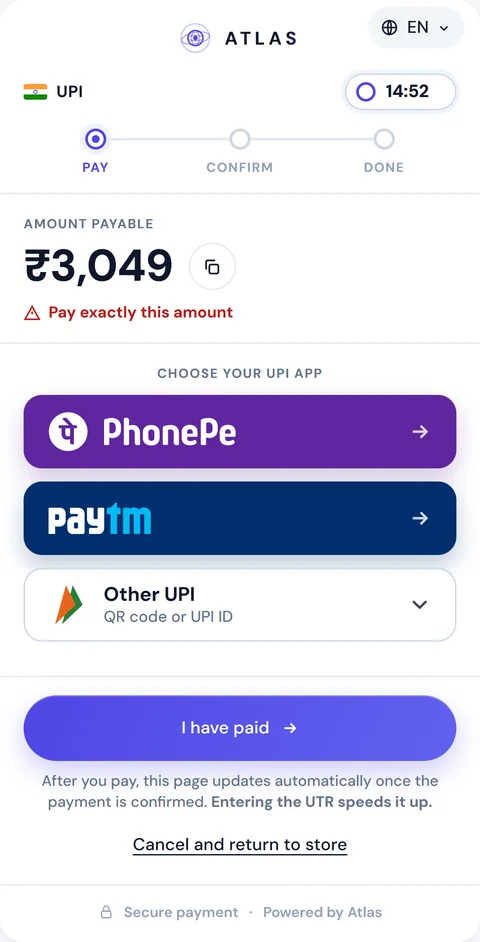
On a phone the buyer taps PhonePe or Paytm, or opens Other UPI to see the QR and the UPI ID. On a desktop they scan the QR with their phone.
-
The buyer approves
The app opens with the payee and the amount filled in. The buyer checks them and enters their UPI PIN.
-
The UTR reaches the order
The buyer can type the 12-digit UTR on the payment page, you can relay it from your own screen, or ATLAS records it when it confirms the payment.
-
You get the webhook
Once the payment is confirmed the order completes and the completion webhook arrives with the UTR. The buyer goes back to your return URL.
{ "amount": 3049, "currency": "INR", "geo": 3, "expiresIn": 900, "paymentMethod": "upi_intent", "merchantOrderId": "order-12345", "clientReference": "customer-7781"}{ "event": "pay_in.completed", "payInId": "1c75c312-93f3-4b34-903e-10fb38a56bec", "displayId": "PI00000991", "merchantOrderId": "order-12345", "status": "Completed", "geo": "India", "utr": "417512345678"}UPI and UPI Intent: two codes on one rail
India requires a method code on every pay-in; without one the request fails validation. Two of the three codes are UPI, and upi and upi_intent share one rail. The payment-methods endpoint lists both as UPI, the same accounts serve them, and the UTR flow and the webhooks are identical.
What differs is the hand-off you plan to show. Pick upi_intent when your screen leads with a button that opens the buyer's UPI app, and upi when it leads with the QR. Either way the response carries an intent link with the payee, the amount and the currency, so you can change the screen later without changing the method code. On the ATLAS payment page both codes look the same to the buyer.
[ { "code": "imps", "name": "IMPS", "type": "imps" }, { "code": "upi", "name": "UPI", "type": "upi" }, { "code": "upi_intent", "name": "UPI Intent", "type": "upi" }]Four ways to put a UPI payment on screen
On your own screen you draw the payment from the create response. A UPI order gives you four options. They all point at the same UPI ID and the same amount, so you can show several at once and let the buyer choose.
| Option | What the buyer does | Response fields |
|---|---|---|
| QR code | Scans it with any UPI app. The main option on a desktop | qrImageBase64, qrPayload |
| UPI ID | Copies the VPA and the amount into their app by hand. The only option where the amount can be mistyped, so keep it last | upiVpa, amount |
| UPI Intent | Taps one button, picks an installed UPI app, and it opens pre-filled. Phones with a UPI app, mostly Android | upiIntentLink |
| PhonePe and Paytm | Taps the app's button and lands on its own send-money screen, amount locked | upiAppLinks, with includeUpiAppLinks: true |
The app links open each app's own send-money screen, so the buyer has nothing to type. PhonePe takes the amount in paise with editing switched off, Paytm in rupees, and neither lets the buyer change it.
Use the links as button hrefs exactly as they arrive, and read every key by name: one that doesn't apply to an order is left out. The app routes are app screens, not public APIs, so keep the QR and the UPI ID beside the buttons, and open the screen in the buyer's browser, since the links fail inside a nested iframe or most in-app WebViews. Or skip the build: the hosted UPI payment page renders all of this for you.
{ "amount": 3049, "currency": "INR", "geo": 3, "expiresIn": 900, "merchantOrderId": "order-in-intent-12345", "clientReference": "customer-7781", "paymentMethod": "upi_intent", "includeUpiAppLinks": true}{ "upiVpa": "receiver.demo@ybl", "upiIntentLink": "upi://pay?pa=receiver.demo%40ybl&pn=Demo%20Receiver&am=3049.00&cu=INR", "amount": 3049, "qrImageBase64": "data:image/png;base64,iVBORw0KGgo...", "upiAppLinks": { "phonepe": "phonepe://native?data=eyJjb250YWN0Ijp7…&id=p2ppayment", "paytm": "paytmmp://cash_wallet?pa=receiver.demo%40ybl&am=3049.00&cu=INR&featuretype=money_transfer" }}Confirmation and the UTR
In India the UTR is the evidence that closes an order. A UPI pay-in can't be confirmed without one: you relay it with POST /api/merchant/pay-in/{payInId}/utr, or ATLAS records it when it confirms the incoming payment, and checks it against the amount and the time.
On the hosted page the UTR step is optional for the buyer. After "I have paid" they can type it, and a pasted bank message is cut down to its first run of 12 digits. If they type nothing, the page keeps polling and switches to success when the payment is confirmed.
A UPI ID holds one open order per exact amount. If your account has amount adjustment switched on, an order whose exact amount is already open on every UPI ID is served at the nearest free amount within the range set for your account. Show amount to the buyer as returned; you are credited for requestedAmount. Adjustment is off by default.
Pay-outs to a UPI ID
Send POST /api/merchant/pay-out with paymentMethod: "upi" and recipientUpiVpa in handle@psp form; on this rail the UPI ID is the whole recipient, with no account number, bank or IFSC. ATLAS sends the pay-out from a local account in its network, and pay_out.completed echoes the VPA. Leave paymentMethod out and an India pay-out goes by IMPS. The full pay-out flow is on the pay-outs page.
UPI or IMPS
Both rails belong to NPCI, and in ATLAS both close on a UTR. The difference is the address the buyer pays to.
| Detail | UPI | IMPS |
|---|---|---|
| Address | A UPI ID, by QR, intent link or app button | An account number and IFSC |
| Amount | Filled in for the buyer | Typed by the buyer, so ATLAS never adjusts it |
| Where the buyer pays | Any UPI app | Their banking app |
| Confirmation | UTR | UTR |
You can offer both: one payment page serves UPI, UPI Intent and IMPS, and adapts to the code you send.
From UTR to USDT
A UPI pay-in waits until its UTR is checked, then completes, expires or fails. Credit it from the signed completion webhook, which carries the UTR, or from the status endpoint, never from the buyer's redirect. See webhook signatures and retries for verification.
Each completed order adds its USDT value, fixed when the order is created, to your balance. Auto-settle or a withdrawal on request takes it to your TRC-20 wallet. The rest of the market is on the payments in India page.
FAQ
What is the difference between upi and upi_intent?
They run on one rail with the same accounts, UTR flow and webhooks. Choose upi_intent when your screen leads with an app button and upi when it leads with the QR.
Can I show PhonePe and Paytm buttons on my own checkout?
Yes. Send includeUpiAppLinks: true and put upiAppLinks.phonepe and upiAppLinks.paytm into button hrefs unchanged. Keep the QR and the UPI ID next to them.
Does ATLAS send UPI collect requests to the buyer?
No. In every option the buyer starts the payment from their own app: by QR, UPI ID, the intent link or the PhonePe and Paytm links. ATLAS then matches that transfer to your order.
Is the UTR required?
A UPI order is confirmed against a UTR, which you relay through the API or ATLAS records when it confirms the payment. On the hosted page, typing it is optional for the buyer.
Does the UPI Intent link work on iPhone and desktop?
The intent link needs a phone with a UPI app, mostly Android. Keep the QR as the fallback on iOS and desktop.
Is there a hosted UPI payment page?
Yes. Add a checkout object to the pay-in and send the buyer to checkout.url; the page speaks English and Hindi.
Can I pay out to a UPI ID?
Yes, with paymentMethod: "upi" and recipientUpiVpa. Amounts are whole rupees, as on pay-ins.