Korea bank transfer payment API
Take KRW bank transfers in South Korea and pay out to Korean bank accounts through one API. Each pay-in gets an account number and a bank for the buyer, each pay-out needs the same two, and you settle in USDT.
Bank transfers in Korea, for a merchant
A Korean account transfer goes from the buyer's banking app straight to a named account: the buyer picks the receiving bank, enters the account number, checks the holder's name the bank shows, and sends whole won. The ATLAS catalog for pay-outs includes KB Kookmin Bank, Shinhan Bank, Woori Bank, Hana Bank, KakaoBank and Toss Bank.
In ATLAS this is the kor_bank method. The money lands in a local receiving account in the ATLAS network, and ATLAS confirms it from the receiving bank's notification. The same rail carries your pay-outs: it is the only pay-out method in South Korea.
 Bank transfer South Korea
paymentMethod kor_bank
- WaitingPayment Account, bank and holder sent to the buyer
- Deposit matched By the exact amount, no reference
- Completed Credited to your USDT balance
How a buyer pays by bank transfer through ATLAS
-
Create a bank transfer order
Your server creates a pay-in with the bank transfer method code, in KRW, for a whole-won amount.
-
Get an account, a bank and a holder
The response carries the account number, the bank and the account holder.
-
The buyer sends one transfer
From their banking app the buyer sends the exact amount to that account in one transfer, as the payment page asks.
-
One tap on "I have paid"
On the hosted page that is one tap on "I have paid". No reference is asked for.
-
ATLAS matches the deposit
ATLAS matches the deposit to the order, the pay-in completes, the completion webhook arrives and the buyer goes back to your site.
{ "amount": 50000, "currency": "KRW", "geo": 4, "expiresIn": 900, "paymentMethod": "kor_bank", "merchantOrderId": "order-12345", "clientReference": "customer-7781"}{ "event": "pay_in.completed", "payInId": "1c75c312-93f3-4b34-903e-10fb38a56bec", "displayId": "PI00000995", "merchantOrderId": "order-12345", "status": "Completed", "geo": "SouthKorea", "utr": null}What you send and what comes back
paymentMethod is required in South Korea because two methods live there, kor_bank and kakao_pay. A missing value returns 400 VALIDATION_ERROR, and GET /api/merchant/payment-methods?geo=SouthKorea shows the codes switched on for your account. Amounts are whole won; send 50000.5 and the request fails with VALIDATION_ERROR.
A bank transfer order returns the account and nothing to scan: no QR and no app link. You show three things, the account number, the bank and the holder name, and the amount from amount. The response leaves out every key that doesn't apply to the order, so read the ones you need by name.
{ "amount": 50000, "currency": "KRW", "geo": 4, "expiresIn": 900, "merchantOrderId": "order-kr-12345", "clientReference": "customer-7781", "paymentMethod": "kor_bank"}{ "displayId": "PI00000032", "geo": "SouthKorea", "ownerName": "Demo Receiver", "bankName": "KB Kookmin Bank", "accountNumber": "110123456789", "amount": 50000, "requiresManualConfirmation": true}Matching a transfer without a reference
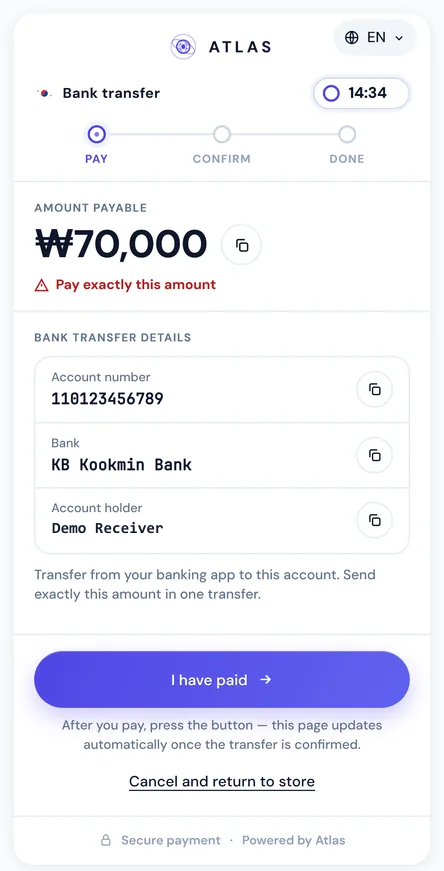
A Korean bank transfer carries no transaction reference of its own, so a Korean pay-in confirms without one. ATLAS matches the deposit against the order instead, which is why the exact amount matters: the payment page puts "Pay exactly this amount" under the figure and asks for a single transfer.
If your own checkout collects a reference from the buyer anyway, you can pass it with POST /api/merchant/pay-in/{payInId}/utr. ATLAS keeps it on the order and uses it as extra context when it matches the deposit. It is optional, and you don't need it to get pay_in.completed.
The hosted page for bank transfers
With a checkout object on the pay-in you get a hosted page at checkout.url, or checkout.embedUrl to place it inside your own checkout. For kor_bank it lists the account number, the bank and the account holder, each with a copy button, and a line telling the buyer to transfer from their banking app. It runs in Korean or English, counts down to expiry, and keeps polling until the transfer is confirmed, even if the buyer does nothing more on the page.
The page is covered in full on the hosted payment page, and you can embed it with embedded checkout.
Pay-outs to Korean bank accounts
kor_bank is the one pay-out rail in South Korea, so you can leave paymentMethod out. Send recipientAccountNumber, 5 to 20 digits with hyphens or spaces allowed, and recipientBank. GET /api/merchant/banks?geo=SouthKorea returns the bank catalog with stable codes such as kb_kookmin_bank; pass the code or the name. Any other recipient field is rejected, and so is paymentMethod: "kakao_pay".
The pay-out is paid from your USDT balance, and pay_out.completed echoes the account number and bank. The whole lifecycle, from Pending to Completed, is on the pay-outs page.
{ "recipientAccountNumber": "110-123-456789", "recipientBank": "KB Kookmin Bank", "recipientName": "Demo Receiver", "amount": 150000, "currency": "KRW", "geo": 4, "expiresIn": 1800, "merchantOrderId": "payout-kr-12345", "clientReference": "customer-7781"}{ "payOutId": "880e8400-e29b-41d4-a716-446655440333", "displayId": "PO00000051", "amountFiat": 150000, "currency": "KRW", "expiresAt": "2026-09-09T16:00:00Z"}Bank transfer or Kakao Pay
Kakao Pay hands the buyer a QR and opens the app; a bank transfer hands them an account to type into their banking app. Both take KRW, both confirm without a reference, and one hosted page serves both. Only the bank transfer pays out.
From a matched deposit to USDT
A bank transfer order waits in WaitingPayment until the deposit is matched, then ends in Completed, Expired or Failed; requiresManualConfirmation is always true in South Korea. Credit an order only from the signed webhook or a status call, never from the buyer's redirect, and see webhook signatures and retries for verification.
Completed orders add USDT to your balance. Auto-settle or a withdrawal on request takes it to your TRC-20 wallet. Kakao Pay, the hosted page in Korean and the market setup are on payments in South Korea.
FAQ
Which paymentMethod do I send for a Korean bank transfer?
kor_bank. It is required in South Korea, where it shares the market with kakao_pay.
Does the buyer have to send a transfer reference?
No. Korean bank transfers confirm without one; ATLAS matches the deposit to the order.
Can I send decimals in a KRW amount?
No. Pay-ins and pay-outs take whole won, and a fractional amount gets VALIDATION_ERROR.
How do I get the list of Korean banks for pay-outs?
Call GET /api/merchant/banks?geo=SouthKorea. The codes stay the same across releases, so you can store them.
What does a pay-out to a Korean account need?
recipientAccountNumber and recipientBank, plus the common fields such as recipientName.
Is the payment page available in Korean?
Yes. Pass locale: "ko" in the checkout object, or "en" for English.