Payment link API One call returns the checkout URL
Add a checkout object to POST /api/merchant/pay-in and the response carries checkout.url, a link to the hosted ATLAS pay page for that order. Redirect the buyer to it or send it to them, and skip building a payment screen.
How the payment link works
You make one server call. ATLAS hosts the page and reports the result back to you.
-
Create the pay-in
your server signs the create request with a return URL
-
Hand over the link
redirect the buyer to the checkout URL, or send it to them
-
The buyer pays
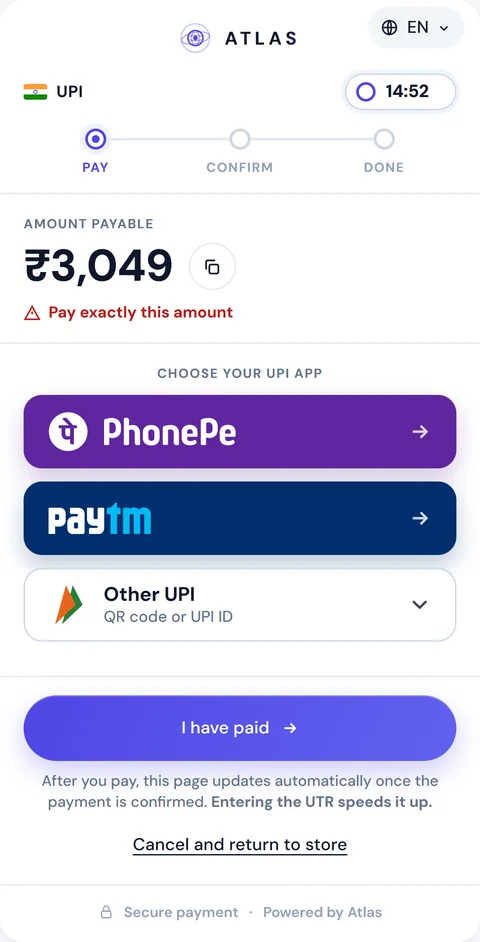
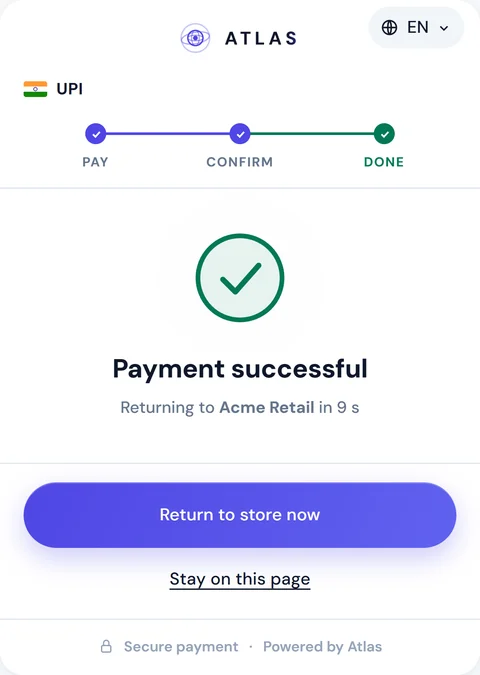
the page shows how to pay, checks for confirmation and switches to success once the payment is confirmed, even if the buyer has left the page
-
You get the result
a signed completion webhook, and the buyer lands on your return URL
{ "checkout": { "returnUrl": "https://shop.example/pay/done?o={PAY_IN_ID}" }}{ "checkout": { "url": "https://api.atlas-online.io/pay/Rn7xW4p..." }}{ "event": "pay_in.completed", "status": "Completed"}The request and the checkout.url response
A payment link is an ordinary pay-in with one extra object. You send the usual amount, currency, geo, expiresIn, merchantOrderId, clientReference and paymentMethod, plus checkout.
returnUrl is the only required member. It must be an absolute HTTPS URL of up to 1,024 characters, with no user info and no fragment. Put the literal {PAY_IN_ID} anywhere in it and ATLAS replaces it with the new pay-in's ID. cancelUrl follows the same rules. locale takes a base language code: hi or en in India, ko or en in South Korea. An unknown value falls back to the market default instead of failing, and checkout.locale tells you which language the page will show.
In the response, checkout.url is the link. The same object also carries embedUrl, the same page in a form you can mount inside your own site, which is how embedded checkout works. Send the same merchantOrderId again and you get the same pay-in and the same url back, so a retried request never makes a second link.
The hosted checkout reference in the API docs has the full request, the response and the error codes.
{ "amount": 3049, "currency": "INR", "geo": 3, "expiresIn": 900, "merchantOrderId": "order-in-checkout-12345", "clientReference": "customer-7781", "paymentMethod": "upi", "checkout": { "returnUrl": "https://shop.example/pay/done?o={PAY_IN_ID}", "cancelUrl": "https://shop.example/cart", "locale": "hi" }}{ "payInId": "5e6f7a8b-9c0d-41e2-b3f4-a5b6c7d8e9f0", "displayId": "PI00000991", "amount": 3049, "currency": "INR", "checkout": { "url": "https://api.atlas-online.io/pay/AbC9fQ2...", "expiresAt": "2026-09-07T09:15:00.000Z", "locale": "hi", "embedUrl": "https://api.atlas-online.io/embed/AbC9fQ2..." }}Where the hosted payment link works
The hosted page serves two markets. In India it takes upi, upi_intent and imps. For UPI orders the buyer chooses PhonePe, Paytm or Other UPI, which opens the QR and the UPI ID. An IMPS order shows the account number, IFSC, bank and account holder. In South Korea it takes kor_bank, which shows the account details, and kakao_pay, which shows the Kakao Pay QR with a button that opens the app when the payload is a kakaopay.com link.
The order also has to be served by the ATLAS trader pool. Any other combination returns 400 CHECKOUT_NOT_SUPPORTED, and no pay-in is created. Retry without checkout and draw the screen yourself with the host to host payment API, which is also how Argentina and Venezuela connect. The hosted payment page itself, with its languages, tracker and branding, has its own page.
-
 India
upiupi_intentimps -
 South Korea
kor_bankkakao_pay -
 Argentina H2H API
-
 Venezuela H2H API
Anything else → 400 CHECKOUT_NOT_SUPPORTED
How long a payment link stays open
A link lives exactly as long as its pay-in. When you send checkout, expiresIn must be between 300 and 3,600 seconds, so a link is open for five minutes at the shortest and one hour at the longest. Anything outside that range is rejected with CHECKOUT_NOT_SUPPORTED.
For pay-by-link, create the link when the buyer is about to pay, because it closes within the hour at most. Each link belongs to one order. If the buyer needs another try, create a new pay-in with a new merchantOrderId and send the new link.
The deadline can move once. When the buyer submits a UTR on an Indian page, or taps "I have paid" on a Korean page, expiresAt may be extended by up to 30 minutes, and any pay_in.expired webhook comes later accordingly. Don't drive a countdown from the checkout.expiresAt in the create response. Read the status endpoint or wait for the webhook.
Return URL, cancel URL and what the redirect carries
Every outcome on the page sends the buyer back to you. Only an explicit cancel uses cancelUrl, and when you leave that out it falls back to returnUrl.
| Outcome | Destination | What to do |
|---|---|---|
| Payment confirmed | returnUrl?payInId=…&merchantOrderId=… | Check the status before you fulfil |
| Not confirmed, or the buyer starts again | returnUrl, same query | Decide whether to offer a new pay-in |
| Expired | returnUrl, same query | Read the status for the reason |
| Buyer cancels | cancelUrl, or returnUrl without one | Nothing changes: the pay-in expires on its own schedule |
The query string carries payInId and merchantOrderId and nothing else. It never contains a status or a signature, so your returnUrl handler has to look the order up, cope with Completed, WaitingPayment, Expired and Failed, and stay idempotent by payInId, because a buyer can reload it.
Confirm payments with the webhook, not the redirect
The redirect only moves the buyer's browser, which may never reach your site: a closed tab or a switch to the banking app is enough to lose it. Credit the order when the signed pay_in.completed webhook arrives, or when GET /api/merchant/pay-in/{payInId}/status returns Completed.
The webhook is a POST to your webhookUrl with an X-Webhook-Signature header, an HMAC-SHA256 of the raw body keyed with your apiSecret. A failed delivery gets up to 10 attempts in total. The payload has your merchantOrderId, and for India the utr, which makes matching it to the order easy. The payments API overview covers signatures, retries and deduplication for every event.
Once a pay-in completes, the USDT credit lands on your balance, and USDT settlement explains how it reaches your wallet.
Try a payment link in the sandbox
You can open a payment link before writing any code. In the sandbox merchant portal, go to Pay-Ins → Test Pay Page, set an amount and press Create payment link. The portal returns the /pay/{token} URL with a QR code of it, so you can open the page on a real phone, and then shows the pay-in's status live as you step through the payer and trader sides.
It is an ordinary pay-in, with the same routing, statuses, expiry and webhooks as one created over the API. When you move to HTTP, the Postman collection in the docs has a ready request called "Create PayIn (India, hosted checkout)".
Merchants who want the commercial picture first can start from ATLAS for merchants.
FAQ
What is a payment link API?
An API call that returns a URL to a hosted payment page for one order. With ATLAS you add checkout to POST /api/merchant/pay-in and the response carries checkout.url. The page's methods and languages are on the hosted payment page.
Can I send the payment link to a customer instead of redirecting?
Yes. checkout.url works as a redirect or as a link you hand to the buyer. It expires with its pay-in, at most one hour after creation.
How long is a payment link valid?
As long as the pay-in: expiresIn must be 300 to 3,600 seconds when you request checkout. The deadline can be extended once, by up to 30 minutes, when the buyer reports a payment on the page.
Does the redirect to my return URL mean the payment succeeded?
No. The redirect carries only payInId and merchantOrderId. Confirm with the signed pay_in.completed webhook or the status endpoint before you fulfil the order.
Can I reuse one payment link for several payments?
No. Each link belongs to one pay-in. For a new attempt, create a new pay-in with a new merchantOrderId.