Kakao Pay integration for merchants
Accept Kakao Pay in South Korea through the ATLAS API. Each order gets its own Kakao Pay QR, the buyer sends the exact amount in won, and you are credited in USDT.
Kakao Pay for a merchant
Kakao Pay is the mobile payment and money transfer service of Kakao, the company behind KakaoTalk. Korean buyers keep money in it or link it to their bank account, and send transfers from the Kakao Pay app.
In ATLAS, Kakao Pay is a pay-in method. Each order is served by a Kakao Pay account in the ATLAS network and handed to the buyer as a QR. The buyer pays into a local receiving account in the ATLAS network, and ATLAS confirms the money arrived. Pay-outs in Korea go by bank transfer instead.
 South Korea
paymentMethod kakao_pay
- WaitingPayment Kakao Pay QR sent to the buyer
- Transfer received No reference needed
- Completed Credited to your USDT balance
How a buyer pays with Kakao Pay through ATLAS
-
Create a Kakao Pay order
Your server creates a pay-in with the Kakao Pay method code, in KRW, for a whole-won amount.
-
Scan the QR from a desktop
On a desktop the buyer opens Kakao Pay on their phone, chooses Scan and points the camera at the screen.
-
Or open Kakao Pay on the same phone
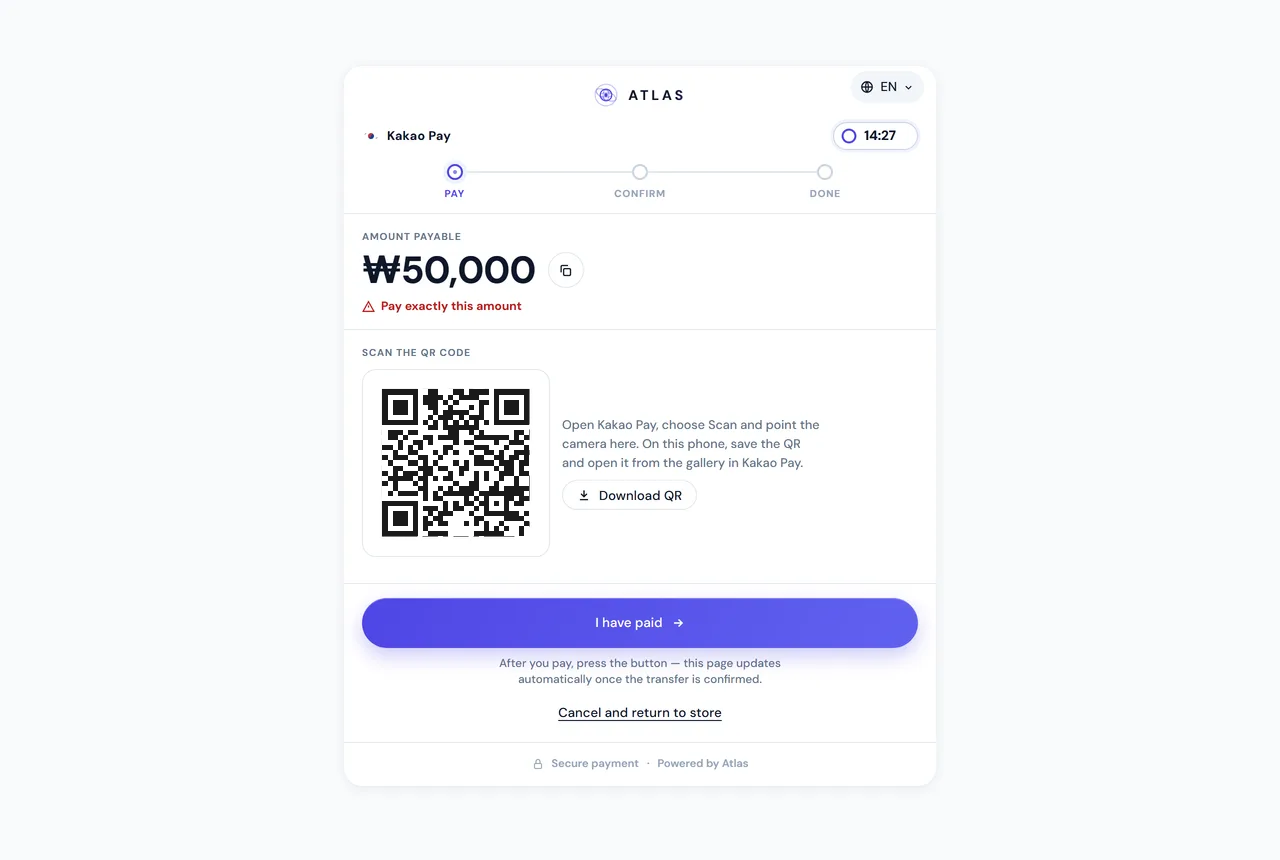
The hosted page opens Kakao Pay directly when the QR holds a kakaopay.com link. If the browser blocks that, an Open Kakao Pay button comes first on the card, and the buyer can also save the QR and open it from the gallery in Kakao Pay.
-
The buyer sends the exact amount
The page marks the figure "Pay exactly this amount". Then the buyer taps "I have paid".
-
ATLAS confirms the transfer
ATLAS confirms the incoming transfer, the pay-in completes, the completion webhook arrives and the buyer returns to your site.
{ "amount": 50000, "currency": "KRW", "geo": 4, "expiresIn": 900, "paymentMethod": "kakao_pay", "merchantOrderId": "order-12345", "clientReference": "customer-7781"}{ "event": "pay_in.completed", "payInId": "1c75c312-93f3-4b34-903e-10fb38a56bec", "displayId": "PI00000994", "merchantOrderId": "order-12345", "status": "Completed", "geo": "SouthKorea", "utr": null}The Kakao Pay QR in the API
South Korea runs two methods under one market, so paymentMethod is required there: kor_bank or kakao_pay. Leave it out and the request fails with 400 VALIDATION_ERROR; send a code your account doesn't have and you get METHOD_NOT_CONTRACTED. GET /api/merchant/payment-methods?geo=SouthKorea lists what is switched on for you.
A Kakao Pay order comes back without an account number. You get bankName: "Kakao Pay", the holder in ownerName, the payable amount, a ready image in qrImageBase64 and the raw qrPayload, for example https://qr.kakaopay.com/AbC9fQ2. Show the image, or draw your own QR from the payload. accountNumber and the other bank keys are absent from a Kakao Pay response, so read keys by name. Amounts are whole won, and a fractional amount is rejected rather than rounded.
{ "amount": 50000, "currency": "KRW", "geo": 4, "expiresIn": 900, "merchantOrderId": "order-kr-kakao-12345", "clientReference": "customer-7781", "paymentMethod": "kakao_pay"}{ "displayId": "PI00000033", "geo": "SouthKorea", "bankName": "Kakao Pay", "amount": 50000, "requiresManualConfirmation": true, "qrImageBase64": "data:image/png;base64,iVBORw0KGgo...", "qrPayload": "https://qr.kakaopay.com/AbC9fQ2"}No reference to collect
Indian methods close on a UTR. Kakao Pay doesn't need one. Neither Korean rail carries a transaction reference of its own, so a Korean pay-in confirms without one, and the hosted page never asks the buyer for any. "I have paid" is a single tap.
If your checkout collects a reference anyway, you can still pass it on, as the Korean bank transfer page describes; pay_in.completed for a Korean order carries utr: null.
A Kakao Pay checkout page, if you want one
Add a checkout object with a returnUrl and you get checkout.url for a hosted page, or checkout.embedUrl to show the same page inside your own site. For kakao_pay it renders the QR with a Download QR button and, on a phone, the Open Kakao Pay button. It speaks Korean and English, with locale: "ko" or "en". With checkout set, expiresIn must be between 300 and 3600, and once the buyer says they have paid the expiry can be extended once, by up to 30 minutes.
The page has its own write-up on the hosted payment page. To send buyers there with nothing to build, see the payment link.
Kakao Pay or a Korean bank transfer
Both methods take KRW and both confirm without a reference. The hand-off differs. Kakao Pay gives the buyer a QR and a button straight into the app, with no account number to copy. A Korean bank transfer gives them an account number, a bank and a holder name to enter in their banking app. Only the bank transfer works for pay-outs: paymentMethod: "kakao_pay" on a pay-out is rejected with VALIDATION_ERROR, and kor_bank is the default rail. Details on the pay-outs page.
From a scanned QR to USDT on your balance
A Kakao Pay order starts in WaitingPayment and waits for a manual confirmation of the transfer, so requiresManualConfirmation is always true. It ends in Completed, Expired or Failed with a signed webhook; see webhook signatures and retries.
The won you collect become USDT on your balance. Auto-settle or a withdrawal on request takes them to your TRC-20 wallet. For the market as a whole, see payments in South Korea.
FAQ
How do I accept Kakao Pay through ATLAS?
Create a pay-in with paymentMethod: "kakao_pay" and show the buyer the QR from the response, or send them to the hosted page.
Does the buyer need to enter a reference after paying?
No. Korean pay-ins confirm without a reference, and the hosted page only asks the buyer to tap "I have paid".
Can the buyer pay on the same phone that shows the QR?
Yes. The hosted page opens Kakao Pay through an Open Kakao Pay button, and the buyer can also save the QR and open it from the gallery.
Can I send pay-outs to Kakao Pay?
No. Kakao Pay is for pay-ins. Pay-outs in South Korea go to bank accounts with kor_bank.
What amounts can a Kakao Pay order take?
Whole won in KRW. A fractional amount is rejected with VALIDATION_ERROR, and your account's minimum and maximum apply.
Which languages does the Kakao Pay page support?
Korean and English. Pass locale in the checkout object; an unknown value falls back to the market default instead of failing.