Embedded checkout on your own payment page
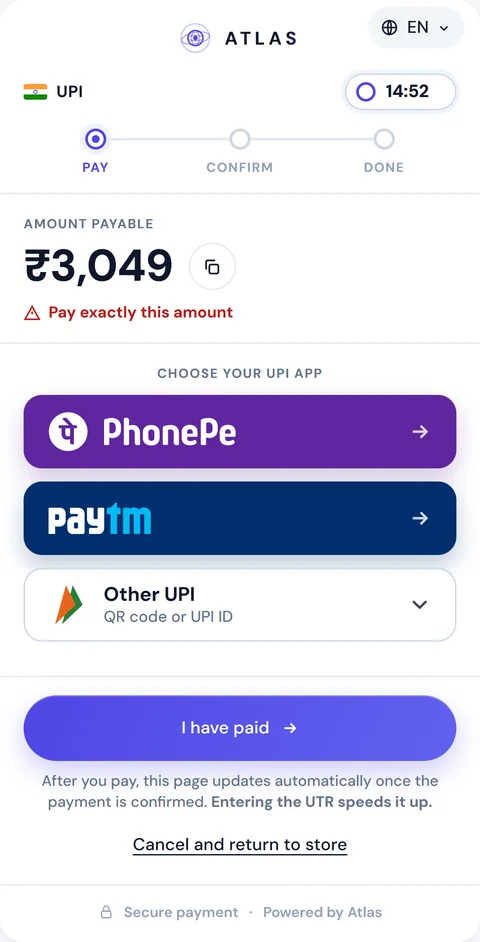
Load one script, call Atlas.mount() with checkout.embedUrl, and the ATLAS pay page renders in an iframe on your checkout. The buyer pays without leaving your site, and your page hears about every step through JavaScript events.
How embedded checkout works
The page in the frame is the same one ATLAS hosts at checkout.url, with the same pay-in, confirmation and webhooks. The frame only changes where the buyer sees it.
-
Create the pay-in
your server sends the create request with a checkout object
-
Pass the link
put the embed URL into the page you render for that buyer
-
Mount it
load the ATLAS script and mount the frame
-
Fulfil on the webhook
ship when the signed completion webhook arrives
embedUrl is single-use and tied to one pay-in. Don't cache it and don't reuse it for another order. url and embedUrl are alternatives: you redirect to one or embed the other, and both show the same pay-in in the same state. If you only need a link to redirect to, the payment link API covers that path.
There is no publishable key in the browser. An embedUrl only exists after a pay-in signed with your HMAC key from your server, and its token is minted for that one order.
{ "checkout": { "embedUrl": "https://api.atlas-online.io/embed/Rn7xW4p..." }}<script src="https://api.atlas-online.io/embed/v1/atlas.js"></script><div id="atlas-pay"></div><script> Atlas.mount('#atlas-pay', { url: checkout.embedUrl });</script>Mount the embeddable payment form with one script
Atlas.mount(target, options) takes a CSS selector or an element and returns an instance. Pass url, the checkout.embedUrl from your pay-in. Everything else is optional: appearance, the branding and layout shorthands, locale, languageSwitcher, height and an onEvent callback. With no theme options at all, the frame renders the theme saved on your account.
The instance gives you on() and off() for events, refresh() to check the status right away (for example when the buyer comes back from their UPI or Kakao Pay app), setAppearance() and setLocale() for live changes without a reload, focus() and unmount(). Calls made before the frame answers are queued and delivered once it is ready.
The embedded checkout reference in the API docs covers allowed domains, appearance and error codes.
<div id="atlas-pay"></div><script src="https://api.atlas-online.io/embed/v1/atlas.js"></script><script> var pay = Atlas.mount('#atlas-pay', { url: checkoutEmbedUrl, // checkout.embedUrl from POST /api/merchant/pay-in branding: { logo: 'none', poweredBy: false }, layout: 'card', locale: 'en', height: 'auto' }); pay.on('success', function (e) { showThankYou(e.displayId); }); // UI hint only pay.on('cancel', function () { location.href = '/cart'; }); pay.on('expired', function () { offerNewOrder(); });</script>Events your page receives
The loader reports what happens inside the frame. Use the events for your interface: thank-you screens, routing back to the cart, analytics.
-
ready: the frame is up, withpayInId,displayId,method,amount,currencyandlocale -
resize: the content height changed (applied for you withheight: 'auto') -
claim: the buyer pressed I have paid, withwithUtrtelling you whether a UTR came with it -
success: the payment was confirmed, withcompletedAt -
expiredandfailed: the order ended without a confirmed payment -
cancel: the buyer asked to leave, and the frame never navigates on its own, so the routing is yours -
intentanddownload: fallbacks when the app link or the QR download needs the top window -
error: codes such asNESTED_FRAME,NO_RESPONSEandINVALID_LINK
Events never carry the UTR, the payee's UPI ID or account number, the beneficiary name, USDT amounts or fees. Any script on your page can read a browser event, chat widgets and extensions included, so the sensitive half stays in the frame and in the signed webhook.
Treat success as a hint for the screen. The buyer's browser can close before it fires, and a page can be tampered with. Fulfil the order on the signed pay_in.completed webhook or on GET /api/merchant/pay-in/{payInId}/status. The payments API overview explains webhook signatures and retries.
Allowed embedding domains
The page refuses to be framed by a site you haven't registered. GET /embed/{token} answers with a frame-ancestors policy built from your list, so on any other origin the browser won't paint it.
The list is an account setting, written from your merchant portal session with PUT /api/merchant/checkout-settings/origins and a body such as { "origins": ["https://shop.example", "https://*.shop.example"] }. Each call replaces the whole list, and an empty array turns embedding off. Until the portal has a screen for it, use that endpoint or ask us to set the domains.
- HTTPS only, scheme and host with an optional port, no path or query
- Up to 10 entries, kept in the order you typed them
-
https://*.shop.examplecovers one label deep and not the bare domain, so register both. A wildcard saved without its apex returns the warningORIGIN_WILDCARD_WITHOUT_APEX - On an unregistered origin the buyer sees a readable 403 notice naming the domain to add, and the loader raises
NO_RESPONSE
{ "origins": ["https://shop.example", "https://*.shop.example"] }Theme the page and hide "Powered by"
One appearance object describes the whole look. The theme saved on your account applies to the hosted page and the embed alike, server-side, before the first paint, so there is no flash of the default style. Preview colours, fonts and corner radius in the sandbox. For production, save the theme through the settings API or ask the ATLAS team. mount({ appearance }) or setAppearance() overrides the saved theme key by key for one page.
Start from a preset: atlas, light, dark, minimal, or auto, which follows the visitor's dark mode. Then adjust 37 public variables for colours, radii, shadow and fonts, plus a dark palette in variablesDark. rules styles named parts of the page such as .Button, .Card and .Input. display switches button style, the step strip, the timer capsule and QR corners. background sets an image, a gradient or a tint behind the card. texts rewrites 15 button and status lines per language.
For branding, set branding.logo to 'merchant' with a logoUrl and the page shows your mark instead of ours. branding.poweredBy: false hides "Powered by", and wordmark: false drops the ATLAS wordmark. Fonts come from an allow-list, either self-hosted families or Google families you opt into per theme. Contrast is checked on save: below WCAG AA you get a warning, and a main text pair below 3:1 is refused.
Free-form CSS isn't accepted: the frame runs on our origin, so neither your scripts nor a third-party widget on your site can read or change the payee's details or the buyer's UTR.
Where embedded checkout works
Like the hosted page, the embed serves India and South Korea, for orders served by the ATLAS trader pool. In India the methods are upi, upi_intent and imps, and a UPI order offers PhonePe, Paytm and Other UPI. In South Korea they are kor_bank and kakao_pay, which shows the Kakao Pay QR. expiresIn must be 300 to 3,600 seconds, and anything outside this scope returns CHECKOUT_NOT_SUPPORTED without creating a pay-in.
The frame speaks English and Hindi, or English and Korean. Its language pill is off by default in an embed, since your page already sets the language. For Argentina, Venezuela or a screen of your own design, use the host to host payment API. The buyer's side of the page is covered on the hosted payment page.
-
 India
upiupi_intentimps -
 South Korea
kor_bankkakao_pay -
 Argentina H2H API
-
 Venezuela H2H API
Anything else → 400 CHECKOUT_NOT_SUPPORTED
Mobile, CSP and the details that catch integrations
Don't nest the frame inside another iframe or an in-app WebView. The UPI and Kakao Pay app hand-off dies there without an error. The loader detects it and raises NESTED_FRAME, which you should treat as "redirect to checkout.url instead". On phones the docs suggest the redirect anyway, and Atlas.shouldRedirect() returns a hint based on viewport, pointer and WebView user agent.
The iframe is full width and follows its content, so keep it out of fixed-height containers with overflow: hidden. If your site sends a Content-Security-Policy, add https://api.atlas-online.io to script-src and frame-src, and leave clipboard-write allowed for the copy buttons. atlas.js changes without a new URL, so don't put an integrity hash on it. If your policy requires SRI, pin the hashed build listed in /embed/v1/manifest.json.
In the sandbox portal, Pay-Ins → Test Pay Page creates a pay-in whose embedUrl you can mount on your staging checkout. For the commercial side, see ATLAS for merchants.
FAQ
What is embedded checkout?
A payment page rendered inside your own site instead of on a separate URL. With ATLAS, the hosted pay page loads in a cross-origin iframe from checkout.embedUrl.
How do I embed the ATLAS payment form?
Create the pay-in with checkout on your server, add https://api.atlas-online.io/embed/v1/atlas.js to your page and call Atlas.mount('#atlas-pay', { url: checkout.embedUrl }).
Which domains can embed my checkout?
Only the origins you register, up to 10, HTTPS only. Any other site gets a 403 notice in the frame.
Can I remove "Powered by ATLAS" and use my own logo?
Yes. Set branding.poweredBy to false, and branding.logo to 'merchant' with a logoUrl to show your mark.
Is the success event enough to ship the order?
No. Fulfil on the signed pay_in.completed webhook or the status endpoint. The success event only updates your screen.
Does embedded checkout work inside a mobile app?
Not inside an in-app WebView or a nested iframe, where the app hand-off fails. Redirect to checkout.url there.
Do I need a publishable key?
No. The pay-in is created server-to-server with your HMAC-signed request, and the embedUrl it returns works for that order only.
Which markets does embedded checkout cover?
India (upi, upi_intent, imps) and South Korea (kor_bank, kakao_pay). Other markets connect through the API.