
A payment gateway for South Korea: bank transfers and Kakao Pay
Buyers in South Korea pay you in won from their bank app or with Kakao Pay, and nobody asks them for a reference. Every completed order is credited to your balance in USDT.
For merchants selling to buyers in Korea
Korean buyers expect to pay in won with the tools they use every day: a transfer from the banking app, or Kakao Pay. ATLAS takes the payment locally and credits USDT to your balance, so you can sell in Korea without a KRW account of your own.
When money has to go the other way, the same integration sends pay-outs to Korean bank accounts. What ATLAS offers merchants across all six markets is on the merchants page.
Pay-ins by bank transfer and Kakao Pay
Korea has two pay-in methods, each on its own rail. Pick one per order with paymentMethod: kor_bank for a bank transfer, kakao_pay for Kakao Pay. The field is required in this market, and amounts are whole won; a fractional amount is rejected rather than rounded.
Bank transfer
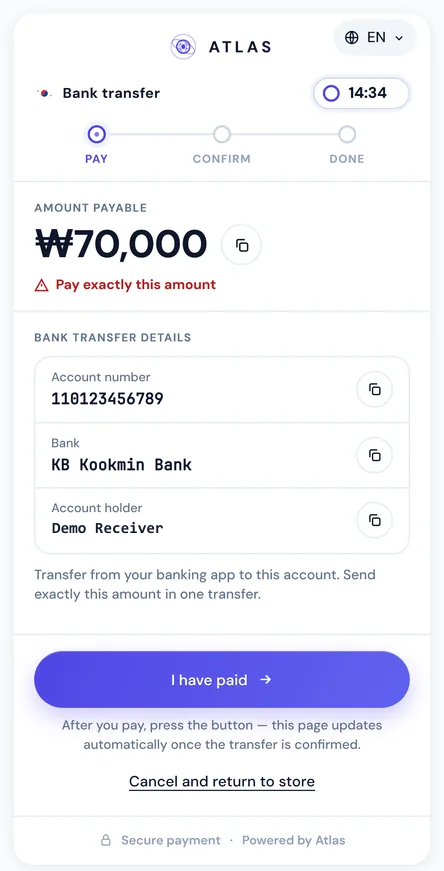
The order returns an account number, the bank and the account holder. The buyer opens their own bank app and sends the amount to that account.
Kakao Pay
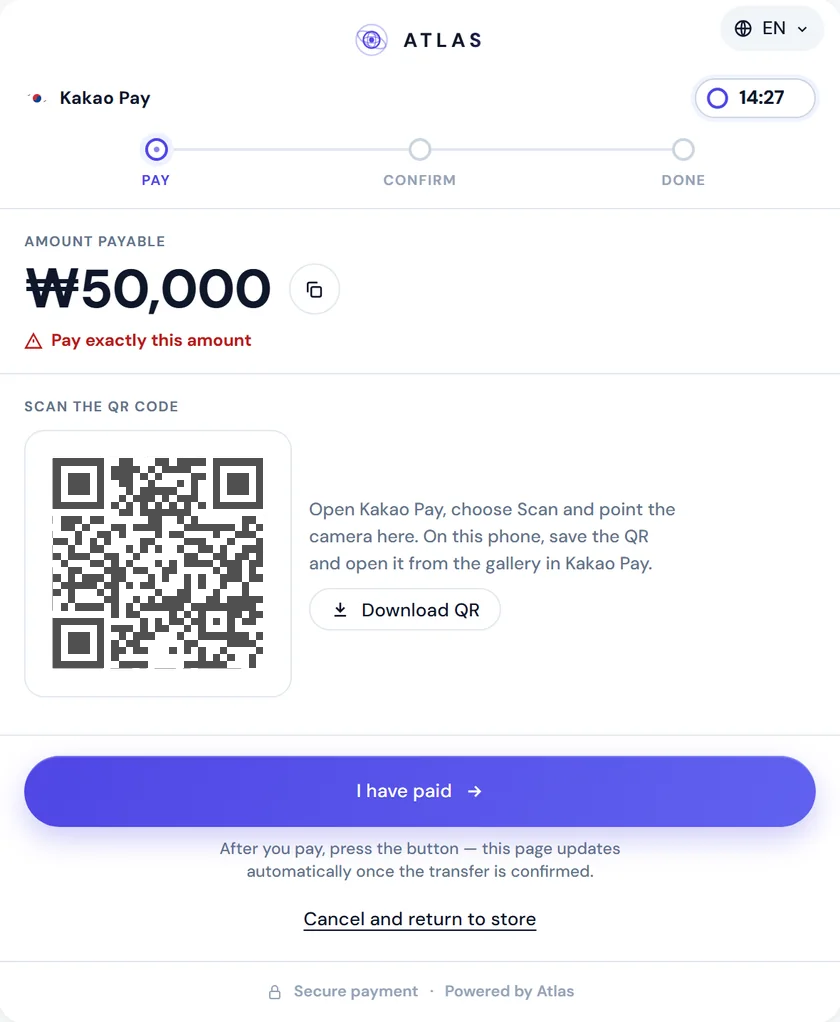
Kakao Pay is a Korean mobile wallet. A kakao_pay order returns the receiving Kakao Pay QR, which the buyer scans in Kakao Pay. When the QR holds a kakaopay.com link, the buyer can also open Kakao Pay straight from a button on their phone.
Neither rail carries a transaction reference, so a Korean pay-in confirms without one. The method pages explain each rail, including how a deposit is matched: Korean bank transfer and Kakao Pay. For the pay-in flow across all markets, see pay-ins.
- Bank transfer Account number, bank and holder; the buyer sends from their bank app
- Kakao Pay A Kakao Pay QR the buyer scans; a button on phones
Pay-outs to Korean bank accounts
In South Korea every pay-out is a bank transfer on the kor_bank rail; Kakao Pay takes pay-ins only. The USDT for a pay-out is reserved from your pay-out balance when you create it and charged once the transfer is confirmed, and pay_out.completed tells you the money has arrived.
The recipient fields and the Korean bank catalog are on the Korean bank transfer page, and the pay-out flow for every market is on the pay-outs page.
Won from the buyer, USDT for you
Your Korean orders are priced in KRW, and your balance is kept in USDT. The create response already shows the order's USDT value, fixed when it is created, which is what you receive once the order completes.
Your USDT reaches your TRC-20 wallet through auto-settle, or on request from the dashboard or through the API. USDT settlement explains auto-settle and the two balances.
Connect with the pay page or your own screen
South Korea is the second market, after India, where the hosted pay page works. It covers both Korean methods on orders served by the ATLAS network.
- Payment link: create the pay-in with a
checkoutobject and send the buyer tocheckout.url. One page handleskor_bankandkakao_payand adapts to the method. - Embedded checkout: the same page inside your checkout. Mount
checkout.embedUrlwithAtlas.mount, and the window opens only on the domains you allow. - H2H API: show the account details or the Kakao Pay QR in your own interface, then wait for
pay_in.completedor pollGET /api/merchant/pay-in/{payInId}/status. There is no reference to collect. Request and response samples are on the Korean bank transfer and Kakao Pay pages.
What a buyer in Korea sees
The pay page speaks Korean or English. Send locale: "ko" and it opens in Korean, with the amount written the way Korean buyers expect, such as ₩128,000.
A bank transfer order shows the account number, the bank and the account holder under the bank transfer details, each with a copy button, and a line asking the buyer to send exactly that amount in one transfer. A Kakao Pay order shows the QR, which the buyer can save to the phone. On a phone, the hosted page tries to open Kakao Pay as soon as it loads; if the browser blocks that, the Open Kakao Pay button is the first thing on the card.
The buyer is never asked for a reference. They tap "I have paid" when they're done. While a countdown runs, the page checks the status on its own, switches to success once the payment is confirmed and sends the buyer back to your returnUrl. A buyer who leaves early doesn't stop the order from completing.
How to start accepting payments in Korea
-
Write to us with the volume you expect and the way you want to connect.
Your Korean methods are enabled per account, and the payment-methods endpoint shows which ones you have.
-
Integrate in the sandbox.
The contracts match production, and the API docs open a South Korea view with only Korean fields and samples.
-
Walk through a payment end to end.
Pay-Ins → Test Pay Page in the sandbox portal creates a pay-in and a QR to open its page on your phone.
-
Switch your keys and address to production and go live.
Limits and terms are agreed beforehand.
FAQ
Which payment methods can I accept in South Korea?
Bank transfer (kor_bank) and Kakao Pay (kakao_pay), in KRW.
Do Korean buyers have to provide a transaction reference?
No. Neither Korean rail carries one, and a Korean pay-in confirms without it. The pay page never asks for a reference.
Which Korean banks can I pay out to?
Any bank in the catalog from GET /api/merchant/banks?geo=SouthKorea. Send its code or its name in recipientBank.
Is the payment page available in Korean?
Yes. It opens in Korean or English; pass locale: "ko" for Korean.
Can KRW amounts have decimals?
No. Pay-ins and pay-outs take whole won, and a fractional amount returns VALIDATION_ERROR.
Can I show the payment details in my own app instead?
Yes. With the H2H API you display the account details or the Kakao Pay QR yourself and credit the order from the pay_in.completed webhook.
How do I get paid for payments in Korea?
In USDT, paid out to your TRC-20 wallet by auto-settle or on request.